Hapi Advanced Configuration: High-Speed Tunneling with Cloudflare Optimized IPs
No public IP? Use Cloudflare optimized IPs to build a high-speed NAT-traversal channel
Use case: You've configured Cloudflare Tunnel but access is slow and latency is high Solution: Combine Cloudflare for SaaS with an optimized IP service to bypass congested nodes Prerequisites: You've completed the basic Hapi setup and own two domains
📺 Video Tutorial
Recommended Viewing
No public IP? Cloudflare optimized IPs for high-speed tunneling - Bilibili
The video walks through the entire configuration process. We strongly recommend watching it before following along.
🎯 What Problem Are We Solving?
Pain Points of the Default Tunnel
When you bind your domain directly to Cloudflare Tunnel:
- ❌ Cloudflare's assigned Anycast IPs may be routed inefficiently from mainland China (detouring through the US or Europe)
- ❌ ISP QoS rate-limiting slows access down
- ❌ Latency reaches hundreds of milliseconds, severely hurting UX
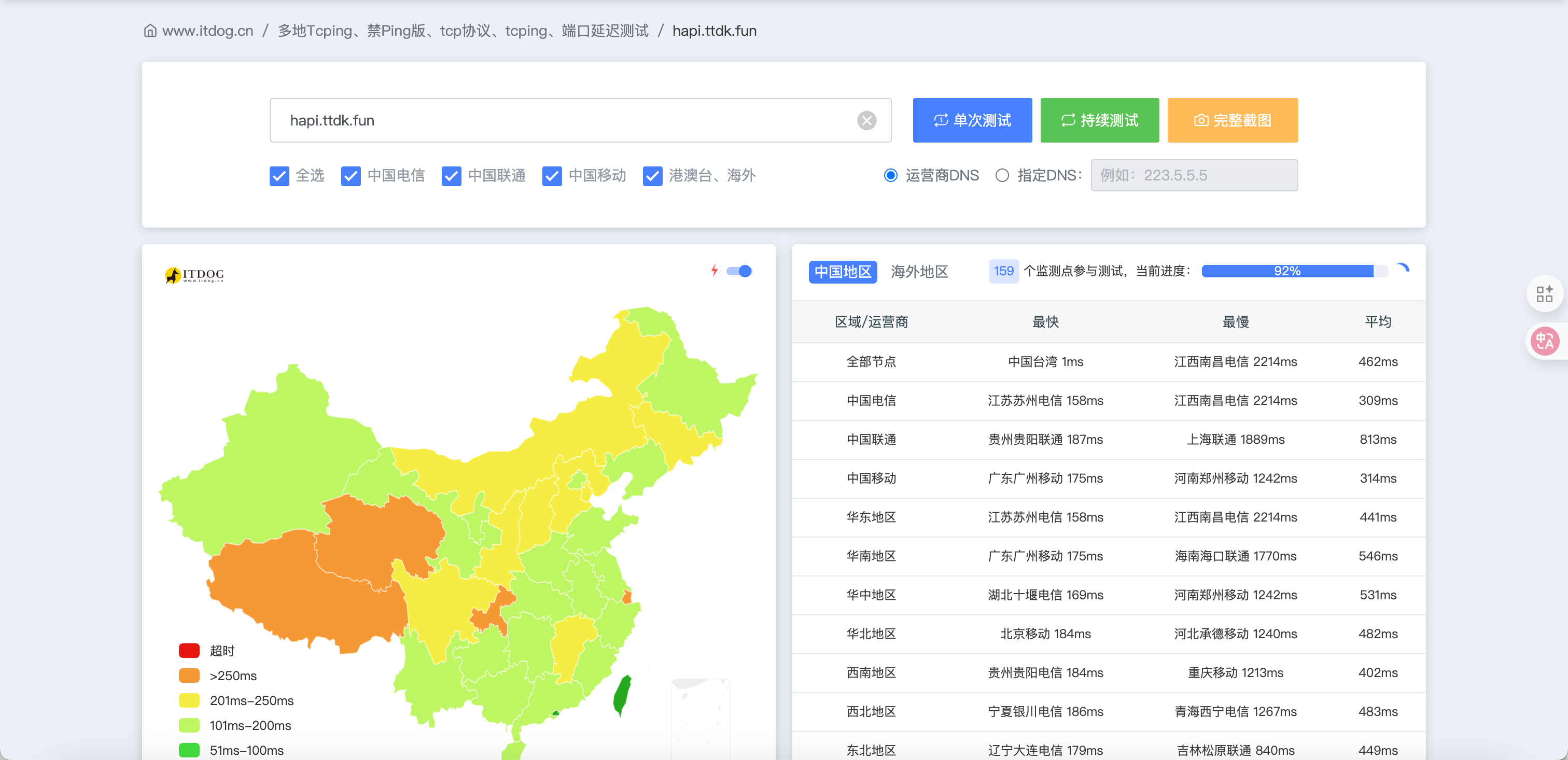
Advantages of the Optimized IP Approach
After this tutorial, you'll get:
- ✅ Traffic is forced through nodes friendly to mainland China networks (Hong Kong, Singapore, etc.)
- ✅ Dramatically improved speed, with latency reduced to tens of milliseconds
- ✅ Completely free, leveraging Cloudflare's enterprise-grade features
- ✅ High stability with automatic best-route switching
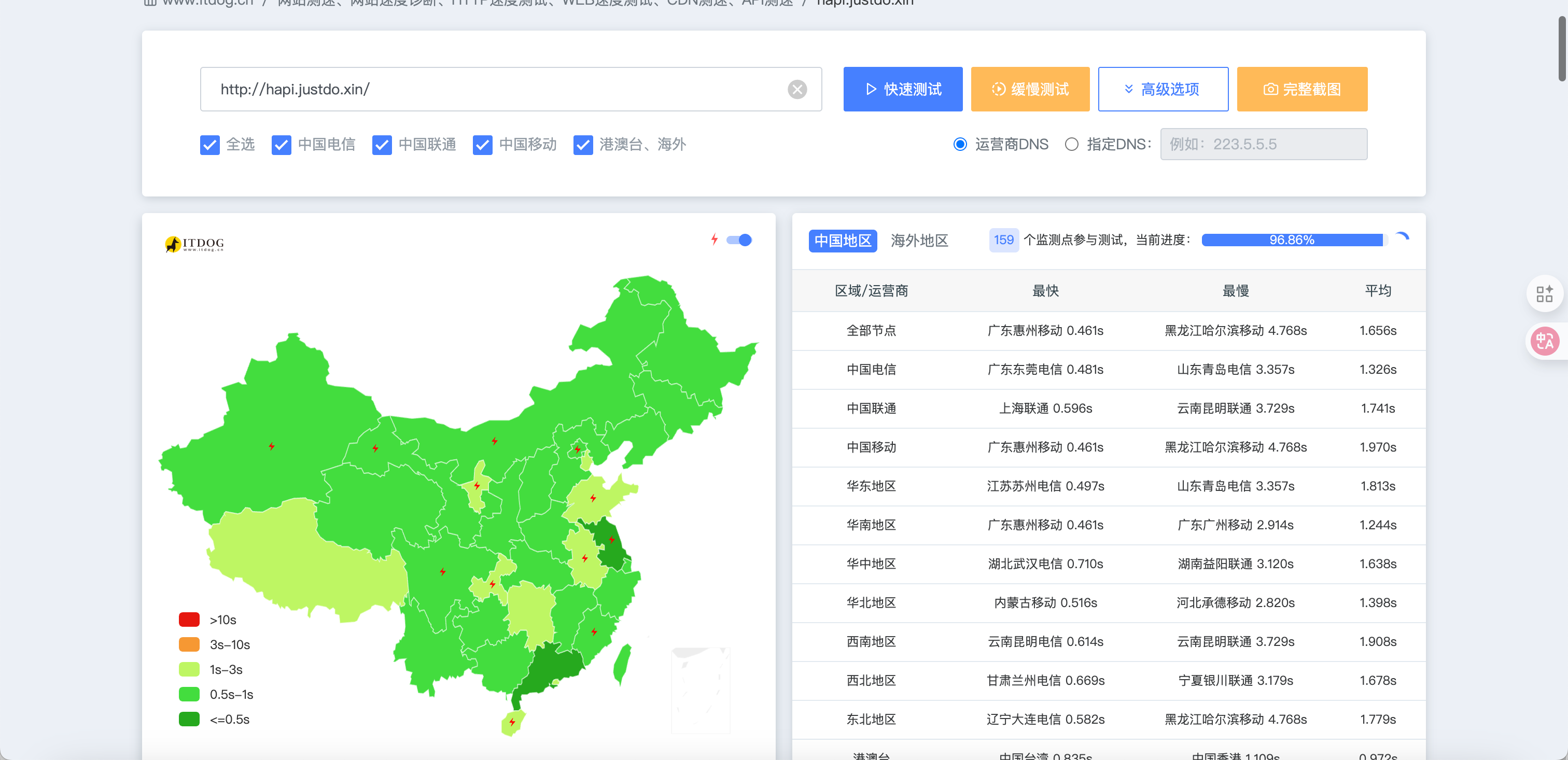
🚀 Speed Comparison
The two screenshots above show a dramatic speed boost after switching to optimized IPs — latency drops from hundreds of milliseconds down to tens, and pages load much more smoothly!
🔍 How It Works
Traffic Flow
When a user visits your domain, traffic flows like this:
User browser
    ↓
DNS resolution: hapi.justdo.xin
    ↓
CNAME → cdn.ttdk.fun
    ↓
CNAME → isp.qzz.io (optimized IP scheduler)
    ↓
Returns the best Cloudflare IP (based on the user's ISP)
    ↓
Cloudflare edge node (identified by Host header)
    ↓
SaaS routing: hapi.justdo.xin → hapi.ttdk.fun
    ↓
Cloudflare Tunnel (encrypted tunnel)
    ↓
Your local server localhost:3006💡 Tip
isp.qzz.io acts as a "smart traffic cop" here, automatically picking the best route for your network environment.
Key Technical Concepts
Optimized IP scheduler: isp.qzz.io returns the fastest, lowest-latency official Cloudflare CDN node IP based on the user's ISP (China Telecom / China Unicom / China Mobile)
Cloudflare for SaaS: Custom Hostnames decouple the "user-facing domain" from the "tunnel domain", enabling traffic to "enter the tunnel via optimized IPs"
Chained DNS resolution: A CNAME chain directs user requests to optimized IPs while keeping Cloudflare's domain identification correct
💡 About the Optimized IP Scheduler
isp.qzz.io is a community-maintained Cloudflare optimized IP scheduling service. It automatically tests speeds and returns the best Cloudflare CDN node for your current network. Visit the site for more details and usage instructions.
🛠️ Configuration Steps
Prerequisites
You'll need:
- Primary domain: The user-facing access domain (e.g.
hapi.justdo.xin) - Secondary domain: The domain that hosts Cloudflare Tunnel (e.g.
ttdk.fun) - Both domains must be managed by Cloudflare
⚠️ Important Notes
- The primary and secondary domains must not be the same domain
- The secondary domain must be one you own — you can't use someone else's
- Both domains must be managed on Cloudflare
Step 1: Configure Cloudflare Tunnel (on the secondary domain)
Set up the Tunnel on your secondary domain (e.g. ttdk.fun):
- Log in to Cloudflare and select the secondary domain
- Go to Zero Trust → Access → Tunnels
- Create a tunnel and install cloudflared
- Configure the public hostname:
- Subdomain:
hapi - Domain:
ttdk.fun - Service:
http://localhost:3006
- Subdomain:
Once done, you should be able to reach your Hapi service via hapi.ttdk.fun.
Step 2: Enable Cloudflare for SaaS (on the secondary domain)
Enable SaaS on the secondary domain (ttdk.fun):
- Open the Cloudflare dashboard
- Select the
ttdk.fundomain - Go to SSL/TLS → Custom Hostnames
- Click Add Custom Hostname
- Fill in:
- Custom Hostname:
hapi.justdo.xin(your primary domain) - Wildcard: unchecked
- Custom Hostname:
- Click Add Custom Hostname
💡 Tip
After adding, two TXT verification records will be generated. Don't configure them yet — continue to the next step.
Step 3: Configure DNS (on the primary domain)
In the DNS settings of the primary domain (justdo.xin), add the following records:
3.1 Add SSL verification records
Copy the two TXT records generated by Cloudflare in Step 2 into the primary domain's DNS:
| Type | Name | Content | Proxy status |
|---|---|---|---|
| TXT | _acme-challenge.hapi | xxxxxxxxxx (copy from the SaaS page) | DNS only |
| TXT | _acme-challenge.hapi | yyyyyyyyyy (copy from the SaaS page) | DNS only |
3.2 Add CNAME records
| Type | Name | Target | Proxy status |
|---|---|---|---|
| CNAME | cdn | isp.qzz.io | DNS only ⚠️ |
| CNAME | hapi | cdn.justdo.xin | DNS only ⚠️ |
🚨 Critical Setting
You must turn off the orange cloud (set proxy status to "DNS only")!
If the proxy is enabled, the DNS resolution chain breaks and the optimized IP routing won't kick in.
Step 4: Configure the Fallback Origin (on the secondary domain)
In the DNS settings of the secondary domain (ttdk.fun):
| Type | Name | Target | Proxy status |
|---|---|---|---|
| CNAME | hapi | [your-tunnel-id].cfargotunnel.com | Proxied ✅ |
💡 Tip
This record is usually generated automatically when you create the Tunnel. Make sure the orange cloud is enabled (proxied).
Step 5: Wait for the SSL Certificate
- Return to the secondary domain's SSL/TLS → Custom Hostnames page
- Check the status of
hapi.justdo.xin - Wait a few minutes — when the status becomes Active, the setup is complete
⏳ Be Patient
SSL certificate issuance usually takes 5–15 minutes. If it isn't active after 30 minutes, double-check that the TXT records were added correctly.
✅ Verifying the Setup
Test Access
In your browser, visit: https://hapi.justdo.xin
If the Hapi UI loads, the setup is working!
Test the Speed Improvement
Compare using ping or a speed-test tool:
Before optimization:
ping hapi.ttdk.fun
# Latency typically 200-500msAfter optimization:
ping hapi.justdo.xin
# Latency typically 20-100ms🎓 Role Summary
| Role | Example Domain | Purpose |
|---|---|---|
| Primary domain | hapi.justdo.xin | The final address you show to users |
| Secondary domain | hapi.ttdk.fun | "Fallback origin" hosting the Tunnel; users don't see this directly |
| Optimized IP scheduler | isp.qzz.io | The "traffic cop" — tells your traffic which uncongested route to take |
| Intermediate domain | cdn.justdo.xin | A stepping stone that points the primary domain toward the optimized IP pool |
🔧 Troubleshooting
SSL certificate stuck on Pending?
Possible causes:
- TXT records added incorrectly or not yet propagated
- DNS propagation hasn't finished
How to fix:
- Use a DNS check tool to verify the TXT records
- Wait for global DNS propagation (up to 24 hours)
- Re-add the Custom Hostname
Getting a 526 error?
Possible causes:
- The
hapirecord on the secondary domain doesn't have the orange cloud (proxy) enabled - Tunnel is not configured properly
How to fix:
- Make sure the orange cloud is enabled for
hapi.ttdk.fun - Verify the Tunnel is running
Access is still slow?
Possible causes:
- The CNAME on the primary domain has the proxy enabled
- The DNS resolution chain is broken
How to fix:
- Make sure the orange cloud is off for both
hapi.justdo.xinandcdn.justdo.xin - Use
nslookupto verify the DNS resolution chain is intact
🚀 Further Optimizations
Run Your Own Optimized IP Service
If you want absolute reliability, you can:
- Use a tool like CloudflareSpeedTest to benchmark locally
- Manually pick the best IPs
- Set up your own optimized domain to replace
isp.qzz.io
Multi-ISP Optimization
You can configure different optimized routes for different ISPs:
- China Telecom users:
cdn-ct.yourdomain.com - China Unicom users:
cdn-cu.yourdomain.com - China Mobile users:
cdn-cm.yourdomain.com
Then use GeoDNS to return different CNAMEs based on the user's ISP.
📚 Related Resources
- Cloudflare for SaaS documentation
- Cloudflare Tunnel documentation
- isp.qzz.io - Optimized IP scheduler
- Video tutorial: Cloudflare optimized IP setup
⚠️ Security Reminders
- Don't leak your Tunnel token
- Audit your Custom Hostnames configuration periodically
- isp.qzz.io is a community-maintained optimized IP service — reliable but unofficial; you can also build your own
- Consider pairing this with Cloudflare Access to restrict access by source
💡 Summary
With this setup, you've:
- ✅ Spent zero money
- ✅ Tapped into Cloudflare's enterprise-grade SaaS features
- ✅ Turned hundreds-of-milliseconds tunneling into a near-direct experience
- ✅ Built a "high-speed tunneling channel"
This is the gold-standard configuration for free, high-speed Cloudflare tunneling!
Next step: With the setup complete, you can happily access your Hapi service from anywhere at full speed! 🎉